A Minecraft house on a mountain
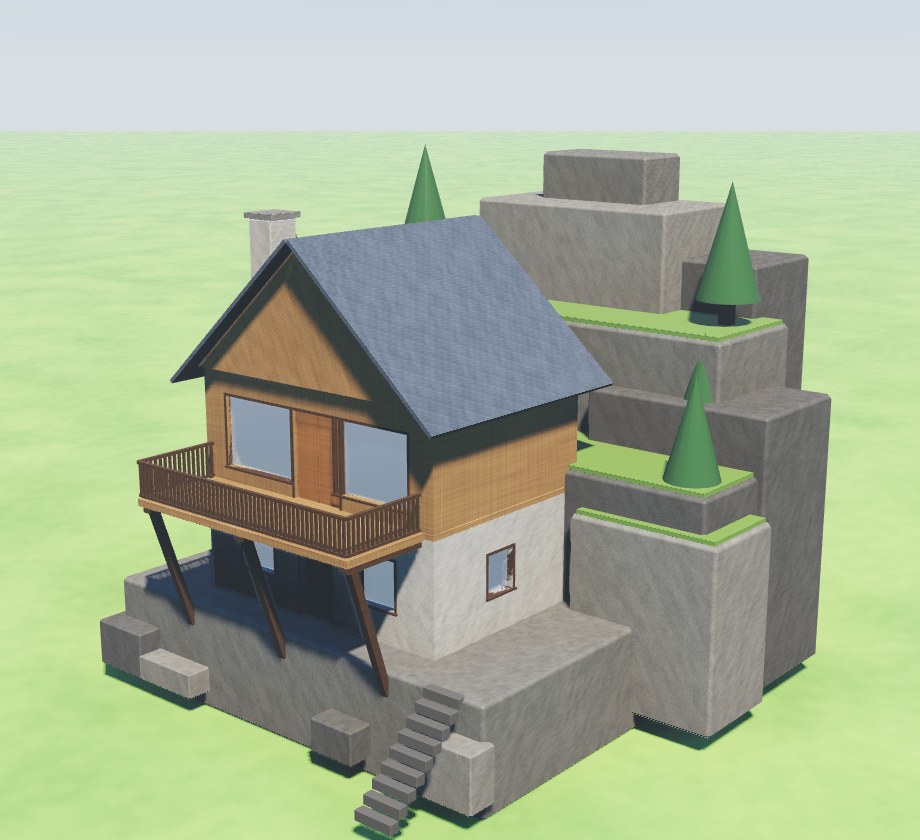
A house on a mountain to build in Minecraft, made in the Forge, Jabbertoon's free 3D builder, from a builder's pieces: a ledge of rock with the mountain rising behind it, a house set into the rock, a deck out over the drop. Open it in your browser, change anything you like, and take it into Minecraft as blocks for Java, Bedrock or Minecraft Education. There is no account to make and nothing to install.
Open it
Open the house on a mountain in the Forge. It opens as your own, ready to change. Or open it with Export showing to take it straight into Minecraft.
Or build the house on a mountain yourself in the Forge, a step at a time: from 🏠 Or a building's piece, its rooms drawn on the Top view, its doors and windows, its roof, each step lit and Do it for me there for any of them.
What it is
- The mountain: a ledge of dark rock 2.4 metres high, boulders at its foot, and the mountain rising behind it in terraces to a peak 13 metres up, moss on each step and pines on them.
- The house, 8 metres by 6, its back set into the rock: a stone ground floor with a door and a window either side, and a timber upper floor with two wide windows and doors out to the deck, its gable facing the view.
- A deck across the front of the upper floor, out past the ledge over the drop, on three beams braced back to the rock face, with a railing round it.
- Stairs cut up the rock at the side, from the foot of the cliff to the ledge, a stone chimney up the end wall and a slate roof.
Take it into Minecraft
- Open it with Export showing and scroll to For Minecraft.
- Set Its longest side to 24 blocks. At 24 it is 23 blocks wide, 19 tall and 24 deep, the mountain behind it and all.
- Pick the file for your Minecraft:
- Java (.schem), with WorldEdit or Litematica: put it in their schematics folder, then
//schem loadand//pastewith WorldEdit, or load it from Litematica's menu. - Java, no mods (.nbt): put it in your world's
generated/minecraft/structuresfolder, then/place template minecraft:and its name, or load it with a structure block. - Bedrock and Minecraft Education (.mcstructure): a structure block, Load, Import.
- Java (.schem), with WorldEdit or Litematica: put it in their schematics folder, then
The blocks it takes
At 24 blocks long it is 4,205 blocks:
| Block | How many | What it is |
|---|---|---|
| Cobbled deepslate | 1,894 | the ledge, the rock and the boulders |
| Deepslate bricks | 1,252 | the darkest rock, the roof and the stairs |
| Spruce planks | 304 | the upper floor, its gable, the floors and the doors |
| Lime terracotta | 278 | the moss on the rock |
| Andesite | 239 | the ground floor's walls and the chimney |
| Gray terracotta | 164 | the window frames and the deck's railing |
| Dark oak planks | 42 | the deck's beams and braces, the pines' trunks |
| Green terracotta | 23 | the pines |
| Glass | 9 | the windows |
Each part becomes the block of what it is made of: a part of stone one of Minecraft's stones, wood its planks, glass glass. A part that is only painted is paint there too: the concrete, terracotta or smooth quartz nearest its colour.
Ask an AI to build one
Ask ChatGPT, Claude, Gemini or any AI assistant that can use tools to build you a house on a mountain with the Jabbertoon tools: it builds one from the same pieces (a rock ledge, walls, windows, a deck, a roof) and changes it as you ask. The answer gives you a link that opens it in the Forge with ⬇ Export showing, ready to take into Minecraft. How to connect your AI
Make it your own
- Bigger or smaller: set its longest side in blocks before you save it, or tick Real size.
- Another look: pick a part and change its colour, or what it is Made of (stone, wood, glass, metal and more). In Minecraft it becomes that stuff's block.
- More to it: pick any part and add to it, as every build in the Forge is made.
More houses: Minecraft house ideas, all seven with their blocks. To make your own from scratch, see the free Minecraft schematic maker.